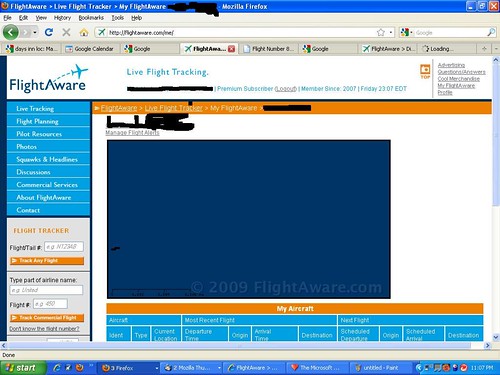
New maps are great, but I can’t track any of my airplanes!!!
Can I go back to the old site where my airplanes can be tracked. I’ve got a situation right now with one of my airplanes, and the page won’t load. Please help. I’m trying to track them as a duty call pilot and it’s not working at all. I’ve tried logging in under different logins and no dice. TN N817PD. This is not cool at all, seriously.
I can deal with no fleet map for two days, but this is ridiculous.
I can’t see any issue with FlightAware. The map and history for N817PD comes up just fine for me. It does show that the flight is “Delayed about 4 hours 30 minutes.” Other than that everything for that aircraft shows up fine.
It’s headed east and has reached the coast. What I want to do is solve the problem so you can get back to tracking the flight yourself. Could you please tell me what browser and version you’re using, and what you see instead of a flight map, including any errors.
OK, I’ve dusted off Internet Explorer. I cannot track AIRBORNE flights with Firefox 3.5.2
No fleet map of my 12 aircraft.
I can now track with IE 7.0.
When I click on an airborne flight in Firefox, I get nothing. Status bar says “stopped”
If the new version is not compatible with Firefox, I wish someone would’ve have told me. This is a logistical nightmare on my part. MVY shuts down at 2100. I have a crew with nowhere to stay tonight.
I’m looking at flightaware.com/live/flight/N817PD in Firefox 3.5.2 right now and it seems fine. What do you see instead of a map? Do you see orange controls to zoom? Do you see a blue square? Is the whole page blank?
Page won’t even load. This has been an issue since the new maps. I’ve got a fleet page with 12 airplanes, and when I click on an airplane that is actually in flight, I get nothing. I haven’t tried IE until now, but that works so I will make sure the computers are set up for IE for the tracking.
P.S. I have not had a “fleet map” on any computer since the new maps were rolled out.
When I click on your link, The new tab pops up and stays stopped at “Loading” with the circle thing going round and round. I’ve tried this on 3 computers at my house. and it’s the same. Al on FF 3.5.2
That is very interesting that all three computers running the latest Firefox would display the same problem. The page stays completely white while it attempts to load indefinitely? Do you have any extensions/addins on all three computers? Can you visit all other pages on FlightAware except tracking individual planes? Did you say this only happens with en route, not scheduled or completed?
FWIW, it appears to have landed 10:49PM EDT, but perhaps you’ve already talked with them. Does that resolve the first concern?
I hope you can figure out the tracking problem too. Maybe clear the private data, including cookies and cache?
Sometimes it is sometimes it isn’t. Most of the time when there is an airplane or airplanes in the air, I have a fleet map, but never have one when there is not an airplane in the air. I really don’t care about that though, more of an aesthetic thing.
Have you tried zooming in and out on the browser – IE8 allows that and it causes havoc sometimes with graphics…I don’t have problems with FlightAware, but other sites…