Error in Lat and Lon

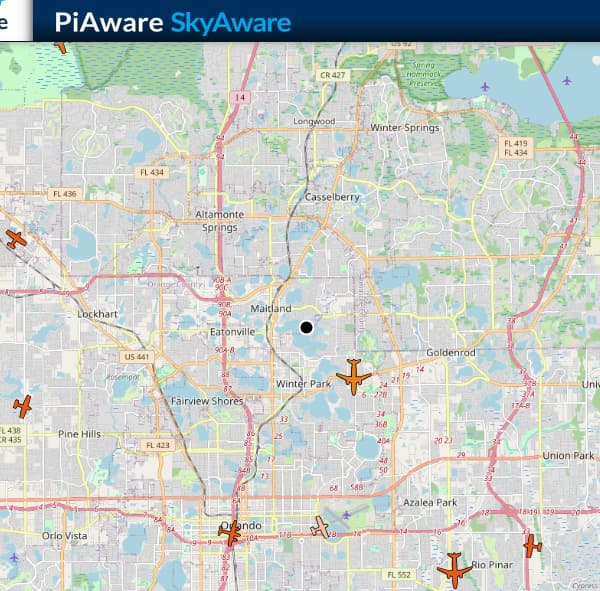
I can’t seem to get an accurate station location. It is off by a few city blocks. I live direct under a busy ILS and want the distance to be accurate. (when it says 0 the plane should be direct overhead but I can’t get this working because the dot shown on the map is off by a few city blocks.

???

Any ideas?

Which method have you been using to set the coordinates? Do you go into your site settings through the gear wheel on your site and then proceed to “edit location”? I find it best to use the automated option that allows you to move the cursor on a local map and pick your exact location which is there converted to Longitude and Latitude.

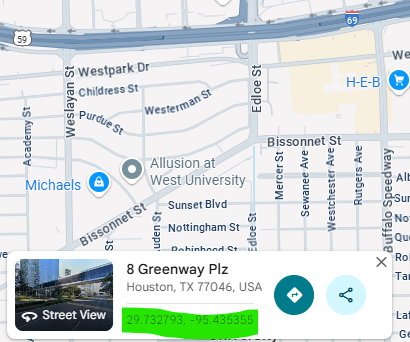
Try visiting Google Maps and find your exact location and click it - you’ll get a dialogue box come up - I’ve highlighted the latitude and longitude on the screenshot attached.


manually enter this into your FlightAware settings.

There’s an option in the settings of your feeder to put the location in manually with 5 decimals behind the comma. Click on the cogwheel on the right of your stats page to set it including the altitude.

1 Like

In addition to the recommendations below, remember that even if you have your location set perfectly, there is an option in the settings to control the precision of your location display on the map. Your actual location will be accurate, but the dot will be moved my a varying amount of up to 1 kilometer. The options are “exact”, “1 km” or “10km”. It defaults to 1 km.

You can change it to exact if it bothers you, but it really only affects the position displayed on the map, not the position used for calculations. It provides a level of obfuscation to help alleviate privacy concerns.

2 Likes

Thanks for all the replies. From reading them it looks like I covered all the bases.

I did try: the gear icon from the stats page and used the map.

Google maps and dishpointer.com

Entered the Lat and Lon direct in the /etc/default/dump1090-fa config file.

I have the exact enabled.

Did try manually entering it on the stats page but I need to go back and review. Best I can remember is I could only use the map and select the location. Did not see a way to do a direct manual entry.

Perhaps the fact I’m not currently running piaware full time and only enabled it for a short time might be part of the issues.

I want to work on the Pi next to my computer then move it to the back of the house and put it on a vlan before I go full time.

Thanks

The issue is that you didn’t even say on which page the location isn’t accurate.

1 Like

As tomvdhorst says, on your Stats page you should see a white cog with a grey background on the right-hand end


Click the cog, and it will bring up a dialogue box into which you can enter the ‘accuracy’ that others see your position as (Exact / 10 km / 10 km), also the location that you want to enter, and any height you want to set.

1 Like

I will try again when I get a chance and provide screen shots if I can’t figure it out.

The page the location I want to be exact is the local view (192.x.x.x:8080)

1 Like

The easiest place to set it is on the Stats page of your FlightAware site


Click Stats, and it will bring up the box we’ve referrred to

It’s still not working. Found there is a check circle at the bottom of the manual enter page that has to be checked before the map is passed over.

As a test I selected a tiny island in a lake about 2 miles away.

Hit save but it does not make any difference.

I believe the config file /etc/default/dump1090-fa overrides and if I enter the island Lat/Lon

The dot move out into the lake and is not on the island.

I watched as an aircraft came in for landing and the distance was being calculated to the dot in the lake and not my station.

That’s what I noticed too. Select Exact, 1 km or 10 km and the dot doesn’t move on the SkyAware map.

I did figure a few things out:

piaware will save the data entered from the stats page to the file, /var/cache/piaware/location.env

If there is a /etc/default/dump1090-fa with the Lat/Lon enabled it will override the data saved to the location.env file

Does not mater what I do I can not get any more accurate then about a half mile.

I gave up for now, my station is out in the Gulf of Mexico :wink:

Are you using decimal lat / lon?
Versus lat / lon with minutes / seconds.

Is this a piaware image?
Then /etc/default/dump1090-fa is overwritten by the image.

I guess you should check the lat lon in the command line:

pgrep -a dump1090

If you don’t want to deal with all this and just have a premade image with a webinterface, take a look at adsb.im maybe. Matter of taste of course.

What, exactly have you got in your “Edit Location” box? The ‘blob’ in the lake is 28.620370, -81.350065, which is how it should be entered (if you don’t want to post your location publicly, PM me it).
What also is in /var/cache/piaware/location.env - is it your 'proper location; or the middle of the lake?

Hi,

This might possibly help. Did you remember to restart the dump1090-fa service after making the .json configuration change?

Like you, I use a “PiAware (Debian Package Add-on) 10.2” package install.

My /etc/default/dump1090-fa has my exact lat/lon, and originally had json accuracy as below (1 km), since I never use the dump1090 live local view.

Accuracy of location written to JSON output

–json-location-accuracy

Accuracy of receiver location in json metadata

(0=no location, 1=approximate, 2=exact)

JSON_LOCATION_ACCURACY=1

My htop shows exact lat/lon for dump1090-fa, but the web view shows slightly off coordinates as expected. It gets that from the receiver .json.


Next I changed JSON_LOCATION_ACCURACY=2 for exact. I did NOT restart dump1090-fa.

The view still shows the old position as position as expected.

Next, I restarted dump1090-fa, which pulled in the new desired .json accuracy.

Refreshing the browser now shows the exact home location as expected.


Good luck,
-Dan

And of course, the receiver.json now shows the full accuracy as expected.

Just your your Pi IP to check before and after you restart the dump1090-fa service)
http://192.168.0.115:8080/data/receiver.json

–Dan

Thanks Dan, I think with your info I can get it sorted out.

On each test (move) I did it was close to the location but always off by a half mile (1 km) so it must be the json setting is on 1 and I need 2. Makes a lot of sense.

Not sure what happened to the SS. I had it zoomed in and the distinct island I was using to test was clearly visible but when I uploaded the image it went back to un zoom.

No, I’m running the add on not the image on a full bookworm (lite) OS.

It’s also running RTLSDR Airband as well as other radio software and I wanted the full OS for the dependencies the other programs require.