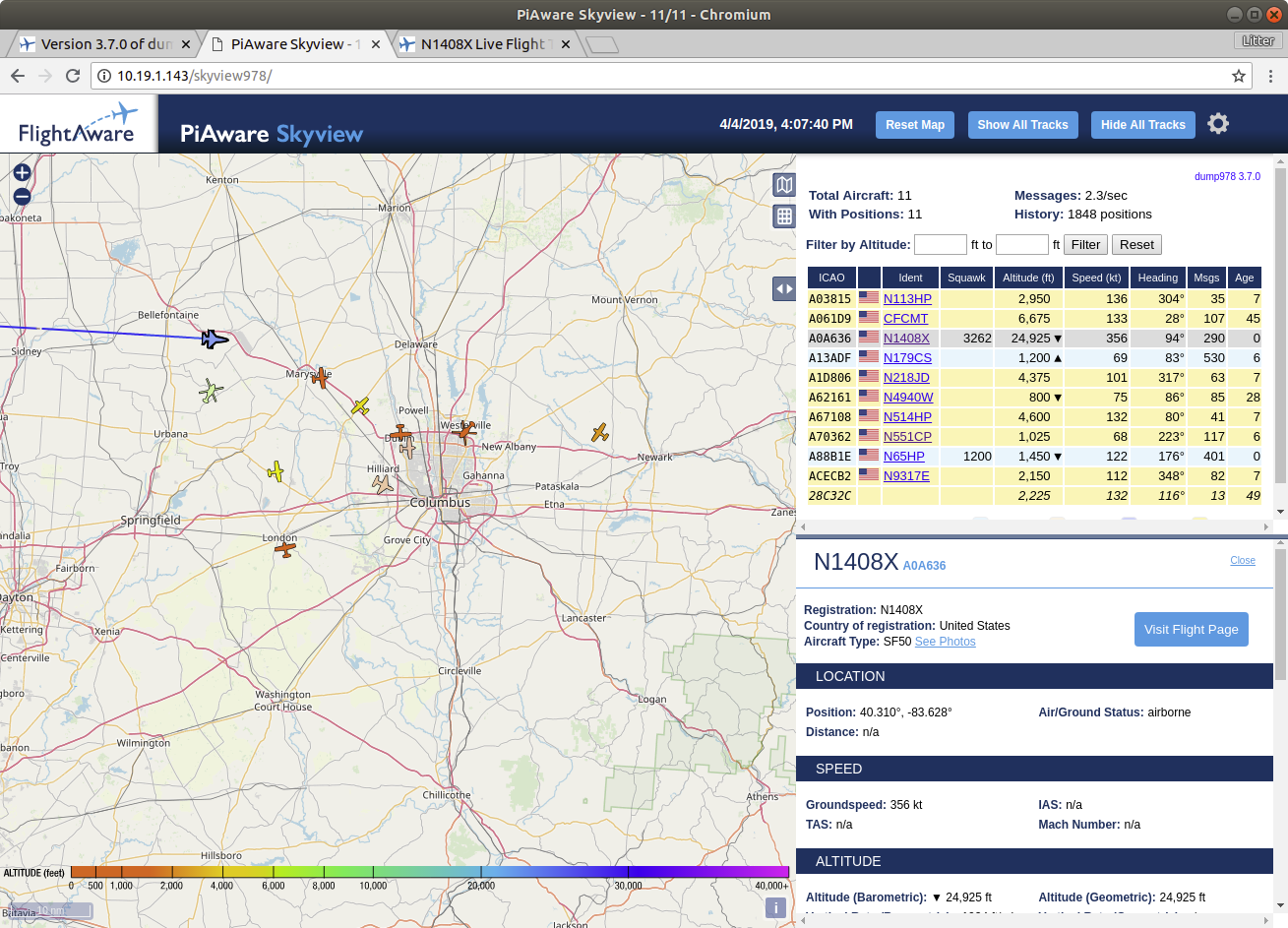
Hmmmm. Dusting off my 978 gear. Appears it has been unplugged for a bit and I didn’t notice. Looking forward to testing the new 3.7.0 SD image when it arrives.
Yes, I have also realized recently that using 1 & 0 as serial number will create confusion as these are used as device numbers also. If you see my posts above, I have used serial numbers 00000011, 00000012 in one case (RPI) and 00000101, 00000102 in another case (Debian on VM).
One more thing. Assigning two or three digit serial to eeprom of dongle has caused corruption of serial number in one of my Pro Sticks. It is recommended to assign an eight digit number like 00000013 or 00000104 instead of simply 3 and 4 or 13 and 104.
I did want to update the “how to” to accomodate these points, but unfortunately the current Discourse format does NOT allow editing a post older than say a month or so.
Good morning, I could use a bit of help / clarification as i am setting up a new separate pi with only 978 capability. Here is where i am at and what I need some help with ( I am pretty light on Linux so have patience please with me)
Started with a 3.6.3 Piaware ‘factory’ build install
1 dongle - orange
1 978mhz antenna
Set the Dump1090 for relay / net only - so it would not try and access the dongle
Git retrieved and ‘make’ dump978-fa
Fixed the various bugs and added the ‘audio’ permission fix.
Dump1090-fa and Dump978-fa and PiAware are all running - (see below for logs)
Now what I need help with is how to connect Dump978-FA output into either dump1090-fa ( so I can use the dump1090-fa map - if that is possible, or just push it to pi-aware directly.
I am a bit confused as to the communications architecture between these 3 applications
I have tried to keep this setup as simple as possible
Any assistance is appreciated and thank you.
ESCOD
● dump978-fa.service - dump978 ADS-B UAT receiver
Loaded: loaded (/lib/systemd/system/dump978-fa.service; enabled; vendor preset: enabled)
Active: active (running) since Thu 2019-04-04 02:33:32 UTC; 9h ago
Docs: PiAware - ADS-B and MLAT Receiver - FlightAware
Main PID: 1032 (dump978-fa)
CGroup: /system.slice/dump978-fa.service
└─1032 /usr/bin/dump978-fa --sdr driver=rtlsdr --format CS8 --raw-port 30978 --j
Apr 04 02:33:33 piaware dump978-fa[1032]: linux; GNU C++ version 6.2.0 20161010; Boost_1061
Apr 04 02:33:33 piaware dump978-fa[1032]: Detached kernel driver
Apr 04 02:33:33 piaware dump978-fa[1032]: Found Rafael Micro R820T tuner
Apr 04 02:33:33 piaware dump978-fa[1032]: Reattached kernel driver
Apr 04 02:33:34 piaware dump978-fa[1032]: Detached kernel driver
Apr 04 02:33:34 piaware dump978-fa[1032]: Found Rafael Micro R820T tuner
Apr 04 02:33:34 piaware dump978-fa[1032]: Exact sample rate is: 2083333.135571 Hz
Apr 04 02:33:34 piaware dump978-fa[1032]: [R82XX] PLL not locked!
Apr 04 02:33:34 piaware dump978-fa[1032]: SoapySDR: using maximum manual gain 49.6 dB
Apr 04 02:33:34 piaware dump978-fa[1032]: SoapySDR: INFO: Using format CS8.
dump1090-fa.service - dump1090 ADS-B receiver (FlightAware customization)
Loaded: loaded (/lib/systemd/system/dump1090-fa.service; enabled; vendor preset: enabled
Active: active (running) since Thu 2019-04-04 02:32:23 UTC; 9h ago
Docs: PiAware - ADS-B and MLAT Receiver - FlightAware
Main PID: 984 (dump1090-fa)
CGroup: /system.slice/dump1090-fa.service
└─984 /usr/bin/dump1090-fa --net-only --net-bo-port 0 --fix --max-range 360 --ne
Apr 04 02:32:23 piaware systemd[1]: Started dump1090 ADS-B receiver (FlightAware customizat
Apr 04 02:32:23 piaware dump1090-fa[984]: Thu Apr 4 02:32:23 2019 UTC dump1090-fa 3.6.3 s
Apr 04 02:32:23 piaware dump1090-fa[984]: Net-only mode, no SDR device or file open.
lines 1-11/11 (END)
The release has been announced for tomorrow so until then you can’t feed with piaware 3.7.0
And dump978-fa produces UAT format which the current piaware doesn’t understand, so you should wait for the release.
When compiling dump978-fa as a package, the skyview978-fa package is created as well.
That provides the map for dump978-fa, just install the skyview978-fa .deb package.
(The map is then reachable at http://pi/skyview978/)
I suppose that could still be used to put the data into a dump1090-fa if someone wants a combined map?
That particular dump1090-fa instance should of course then not be used to feed, just for display purposes.
Build dump978-fa 3.7.0 from the source code. This will build both the dump978-fa_3.7.0.deb AND skyview978_3.7.0.deb packages.
Install both packages.
The dump978-fa is receiver-decoder software, while skyview978 will display UAT978 map. You will then NOT require to install dump1090-fa.
NOTE:
If you want only local UAT978 map, and dont want to feed Flightaware, then you can skip building and installing Piaware package from source code. Just clone dump978-fa source code, and build & install dump978-fa + skyview978
As always, my impatient self won out and I couldn’t wait till tomorrow for the SD card image. Did an initial build following @abcd567’s initial build sequence. Everything came up fine on 1090, even though this is my 978 feeder. Now I just need to shut down the 1090, build 978, and fire that up.
Interested to see the difference between my old mutibility 978 feed and the new 978-fa off the same antennal. This antenna is tuned to 978 not 1090, so the plane/track counts are much lower than my 1090 feeder shown below
All the discussion of 3.7.0 has centred on the addition of UAT for the inclusion of UAT which is only in operation in the US.
Is there any information on changes, enhancements, additions and bugfixes for 1090 and MLAT?
For those of us in countries without UAT will it be possible to turn all the 978 code off to reduce any additional cpu, power and heat with the new code?
And finally, I didn’t like the change in 3.6.3 to put the info for the target aircraft in the bottom of the table in Piaware. I preferred the popup over the map as I generally use a 28" monitor. All my Pis are running 3.6.2 or older. Will there be any imperative to upgrade them to 3.7 if I don’t want UAT?
Last night’s Flughtaware maintenance seems to have fixed the issue with 3.7 feeding data. My 3.7 UAT only site started showing statistics updates after the ha he window.
I expect we will hear more about in today’s announcement.
There is a packaged dump978-fa available
sudo apt-get install dump978-fa
I spent a couple hours last night playing around with getting dump978 installed + piaware3.7 + raspbian stretch on a pizero W with the FA blue dongle and then also the nooelec nano 978 dongle (only on at a time) Mixed results in both cases – the nooelec had dump978 complaining about an overflow, removing soapy audio got me a little farther down the road but in the end I decided I’d wait for the “official” build. Thank you to everyone who posted all their findings in what felt like real time as I walked through the entire thread. Compiling everything manually on the pizw gave me a lot of free time to clean up the apartment


 Now I just need to shut down the 1090, build 978, and fire that up.