I have two piaware stations. One of them experience a power outage often for several hours at a time and then reboots. It is installed at an airport about a hour from my house. It is 10.1 on a Class 10 card. It is only on FA. It is only 978mhz so it is not working hard at all. It is in a temp controlled environment. I have tried 2 new power supplies with no change.
Since I do not live where it is installed it is very tough for me to know if it is a power spike, or something like a wi-fi failure. The time of day or day of the week is not consistent.
I would be curious if anyone has first hand experience in solving this type of issue.
Thank you. Charlie
When you say “power outage”, you seem to mean “feed outage”?
Do you have @wiedehopf 's Graphs1090 loaded - without even reading the logs, that will show if the Pi was down, that the Pi was up, but no network traffic, received signals etc.
This is the email I get. “This email is a friendly notification that your PiAware Receiver ‘M20’ is not currently sending live flight data to FlightAware. We last received data on: 01-Nov-2025 06:06PM”.
I do not think I have the 1090 graphs loaded. If it matters I am only running 978 not 1090. I have the IM on my other site, but this one is FA only. (it does automatically reboot after an hour or so).
All that says is the Pi wasn’t talking to the FA server - not why.
Loading Graphs is useful for a number of diagnostic reasons.
Given you live an hour away, if the owner of the network you are using agrees, loading PiConnect would let you login from home and see what the Pi is doing (if it’s still powered up)
That message does not mean anything has failed or is offline, it just means that you probably have not received any 978 UAT for a certain period of time. I see that occasionally here on my 978 only system, especially on bad weather days.
If you look at your online “Hourly Received Reports” you will see the gray blocks where no traffic at all was received. Looking at the night of 7 NOV, you can see what looks like a 10 hour block of zero traffic. Other nights show a slight break with possibly a single aircraft passing by.
When dump978-fa has no traffic, it will occasionally restart dump978-fa and a couple other things just to make sure everything is okay. That all shows in the logs and is normal. The server will send that e-mail out after a certain number of hours with no traffic.
If you have FA set up to e-mail when a device actually reboots, you will receive those alerts also. The “no traffic” 978 restarts does not actually cause a full reboot. It you are getting reboot alerts, then that is something completely different.
That is very interesting and may be exactly what is going on. This location does not get much traffic. I will look back (as best I can) and compare activity vs the warning.
I know your system is remote, but if you can view the log online with FA using the gear icon, you will probably see something like below. This is a “no recent traffic” message, and then FA restarting faup978 and dump978. The restart happens one hour after no traffic, at the next 5-minute check. Note that 3888 seconds = 64.8 minutes. More info is logged, but this will give you an idea of what to look for. For me, the logged restarts on 978 are verry common. The e-mailed alerts happen much less often after multiple restarts.
Nov 12 12:51:56 raspberrypi piaware[28326]: no new messages received in 3888 seconds, it might just be that there haven’t been any aircraft nearby but I’m going to try to restart everything, just in case…
Nov 12 12:51:57 raspberrypi piaware[28326]: faup978 exited with SIG SIGHUP
Nov 12 12:51:57 raspberrypi piaware[28326]: attempting to restart dump978..
That makes complete sense. My site, 251172, does not get much traffic. I will attach a screen shot and you will see very low activity at night and as you can expect, my warnings of “no data being sent” are using early in the day. I looked at the logs in the gear icon view and there were no recent restarts today.
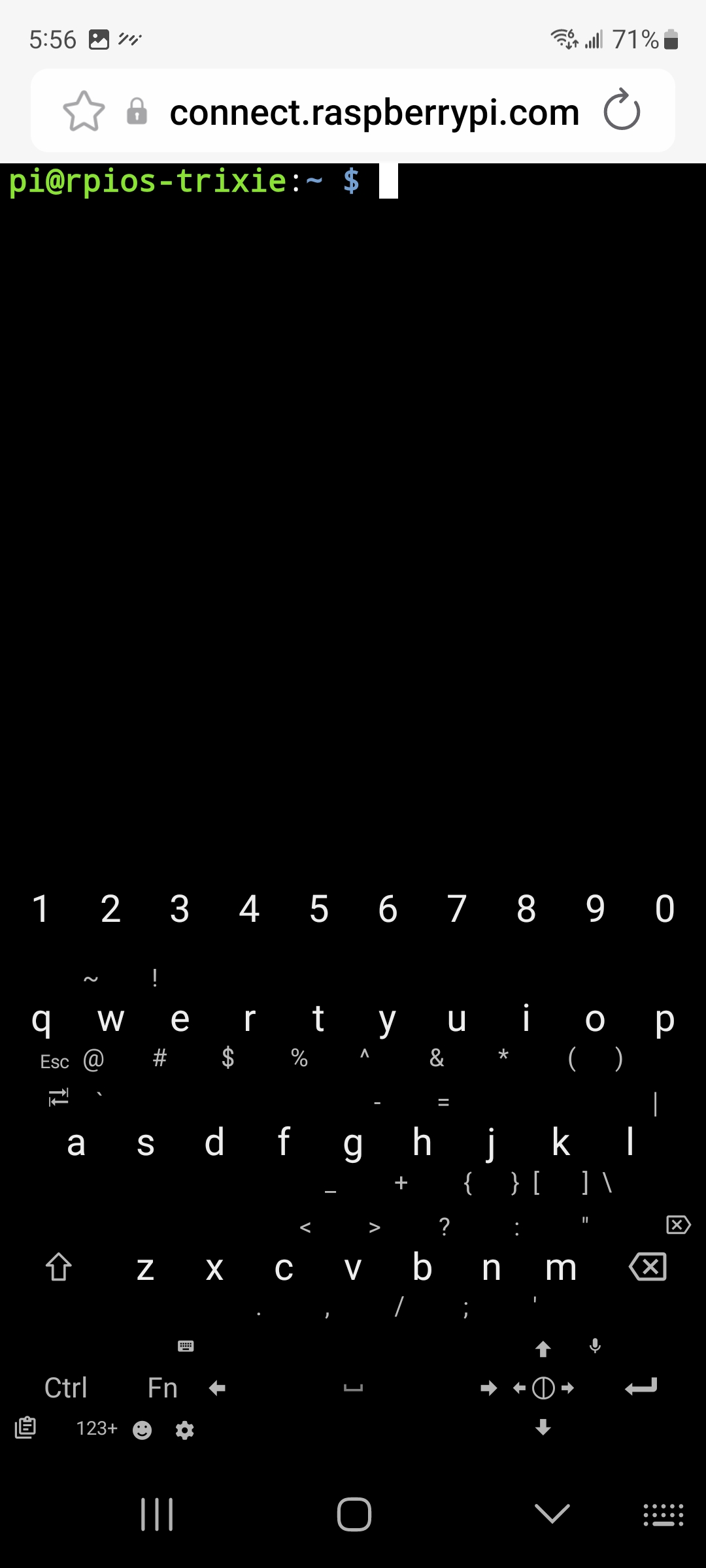
Yes, the rpi-connect creates it on Web Browser when I click the “Connect” button on first screenshot. It is not an App. Please see screenshot on my Desktop which has a wider screen than phone, and clearly displays that the SSH Terminal interface is by using Web Browser Mozilla Firefox.
The Default Keyboard of my Samsung phone does NOT have any Arrows, Ctrl, Function etc keys. Please see first screenshot below.
To solve this issue I have installed one more Keyboard named “Unexpected Keyboard” from Google Play Store. This has Arrows, Ctrl, Function etc Keys. Please see second screenshot below.
I normally use Default Keyborad of my phone. When I am using terminal created by rpi-connect, I switch to the “Unexpected Keyboard”
When installing rpi-connect on raspberry pi os Lite, use the lite version (rpi-connect-lite). If full version (rpi-connect) is installed, it will unnecessarily install a very large number of packages to remotely display GUI/Desktop, which are not needed for raspberrypi os Lite.
As the piaware sd card image is also based on lite version of raspberry pi os, the lite version of rpi-connect should be installed on it.
Personaly, I haven’t bothered with a ‘lite’ OS since my Pi2 died, so I install the ‘normal’ PiConnect and have the choice of a command line or full GUI.
At any particular time, I am at least 6000km from some of my Pi’s, so having full access to my network can be very helpful.
Some of my devices can only be accessed via their built-in webserver, so command line only doesn’t cut it.
Android is more flexible than iOS, which follows typical Apple mentality of rigid control.That is why I never purchased an iPhone, inspite that my wife & children all use and love iPhone, and are hooked to it.
On my Samsung phone, I have also installed “Termux”, which is terminal emulator and Linux environment. I can use it to access my RPis on the same local network to which the Phone is connected through WiFi.
Termux combines powerful terminal emulation with an extensive Linux package collection.
When I open Termux, it opens the default keyboard also, and adds on top of it necessary Arrow, Ctrl, Tab, Escape keys. Please see screenshot below. The keys added to default keyboard by Termux are shown in red rectangle.
Well I’m in the older generation, and never really got hooked on a mobile device like the younger people. Lots of time my iPhone just sits on a shelf – don’t even take it with me when I go somewhere.
There is one situation where a mobile device is kind of great – in the car. Having your phone Bluetooth into the car audio system is nice. Hands free taking on the phone is really useful. And the audio quality is remarkably good for a cell phone.