
Switching to 20 Mhz you need to reduce -e … otherwise you’ll use too much CPU.
The parameters are explained in the configuration file.
1 Like
Thanks.
I did not find the relation that 20 MHz and -e can cause that conflict.
Trying it again with a lower -e value
Yeah, that CPU can process only so many raw samples per second. 20MHz makes 167% samples compared to 12MHz, so it’s normal that you would reduce the -e (that depth of searches trough those samples).
Usually an usage of 92-94% is “safe” enough for me.
Because that CPU usage was bugging me, I had to get a more powerful CPU. It’s slippery slope with this hobby 
1 Like
Changed it to -e 9.5 and the ADS-B CPU went up to 80%.
However i cannot identify a significant change on the different values. Will leave it for another day now to see the performance with higher traffic.
IIRC, you might want to check/adjust gain when going to 20MHz?
1 Like
What CPU you running ? I’ve overclocked my p4 to 2ghz running at 20mhz and -e 10.8. I’m hitting 88% to 90% on the one core…. No lost samples… running the r2
i7-2640M CPU @ 2.80GHz
At 20MHz use -e 13.2
1 Like
Thanks, will give that 20MHz another try at a later point.
But as stated already there was no significant change in date while using it with a lower -e option.
With rather close in terrain blocking stuff and not much trees or something you have to get through, receivers can’t show their strength because there basically are almost no weak signal messages.
It’s been already stated that performance differences aren’t big at all, people that do report a difference either have forest all around them or see planes out to 250 nmi …
You can probably do -e 4 and 12 MHz and not notice much difference 20 MHz -e 9 or whatever your pi can handle 
Very good, that explain the -e option i was asking for previously not getting answered. 
I am living obviously in a comfortable environment
Just in case someone is asking about the power consumption.
I have outdoor a controlled connector for getting it turned off and on remotely. This can measure the power used.
Airsquitter: 0.073 kWh per day, would mean 26 kWh per year
Pi4 with AirSpy and LNA: 0,15 kWh per day, giving 55 kWh per year
Overall not that much…
13 vs 28 Euros per year assuming REALLY expensive power at 50 cents per kWh.
With a premium of 300 Euros for the AirSquitter (or is it more now?), it’ll only take 20 years for the Airsquitter to be worth it for the power saving 
4 Likes
It’s even more. They increased the price to 495 Euro. Is it worth the price?
Well if you want a hassle free device as “fire and forget” it’s ok. But i would not pay that high price now.
I just posted this for the records, but your absolutely right, there are lot more power consuming devices in everyones living area
I can remember seeing a thread about “power consumption” somewhere in this discussion board 
Some minutes ago while checking the stats, it shows this window which disappeared automatically. Do i need to do something or is this still ok?
While seeing this, the MLAT button turned red, but it’s green again now, having 573 servers synced.
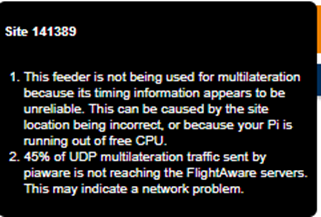
If you’re running 20 MHz … that’s likely the culprit.
As stated (now also in the config file and on the airspy-conf page), it’s an experimental mode for the airspy mini.
Note that this has no relation to lost samples displayed in the log, MLAT issues occur when the airspy mini misses sending some samples or they get lost over USB.
If the software doesn’t have enough CPU to process the samples, that’s when lost samples is displayed. This is actually handled correctly so no MLAT issues with that because the software knows how many samples it skipped and can advance the beast clock.
1 Like
probably not related at all… I was getting that error… wiedehopf helped me with a steer to the SD card. I was running an SSD. Switched to SD card and issue went away…
Thanks again for your quick response
I am planning to switch it back to 12 MHz tomorrow, as i do not see much improvement running at 20.
So far the Raspberry runs good. CPU usage of the ADS-B process is at 80% while the overall is less than 25. There’s only a VRS instance running on the Raspberry.
Thanks. All my devices are running on SD card. Never tried a SSD, especially not to boot from it.
I get that error randomly, usually restarting piaware from the remote commands menu fixes it.
Partially it is related to differences in timing issues between the server and the Raspberry Pi. Raspberry Pi’s don’t have a real time clock module (RTC) so sometimes the device can get a timing difference then. Resyncing PiAware solves this issue
That is clear. On my devices the NTP service is getting the time from my router and this from an official time server.
I did not see it before, just happened occasionally since i am using the Airspy
Maybe i saw it just because in that moment i opened the stats.
If it goes away automatically, i am fine with that
That’s incorrect.
If you’re using an airspy, go to 12 Mhz and see if it stops happening.
The message is primarily about the frequency reference in your SDR. If not every sample makes it to the software, the timing will be off.
And if it’s really the clock being off, install chrony or ntp and the clock won’t be off any longer.
sudo apt install chrony
2 Likes
Thank you for the feedback, it seems that I have made a wrong assumption then. I get it occasionally on a FA Pro plus stick, I have four of them and all report this once in a while, not daily but once a week or so.
I don’t think you can adapt the sampling rate ? Maybe a stupid question but I just don’t know.
I wasn’t refering the the airspy, I don’t have one and can’t say anything usefull in that regard 

1 Like