# Skyaware display issues
**URL:** https://discussions.flightaware.com/t/skyaware-display-issues/58277
**Category:** ADS-B Flight Tracking
**Created:** [December 15, 2019, 10:01am UTC](https://discussions.flightaware.com/t/skyaware-display-issues/58277 "2019-12-15T10:01:33Z")
**Posts on this page:** 20
**Page:** 1
### Author:  [@mbsat99](https://discussions.flightaware.com/u/mbsat99)
#### Post date: [December 15, 2019, 10:01am UTC](https://discussions.flightaware.com/t/skyaware-display-issues/58277/1 "2019-12-15T10:01:34Z")
I am running skyaware and flight aware ver 3.7 on a raspberry pi 3+and when I go to the IP address of the pi using a windows OS and select skyaware the make works perfectly. When I use another pi 3 + or a 4 the skyaware screen has many of the same images. I have searched the internet and flight aware discussions and can’t seem to find an answer to resolve this.
73
Tom
---
### Author:  [@wiedehopf](https://discussions.flightaware.com/u/wiedehopf)
#### Post date: [December 15, 2019, 10:08am UTC](https://discussions.flightaware.com/t/skyaware-display-issues/58277/2 "2019-12-15T10:08:01Z")
> [@mbsat99](#):
>
> When I use another pi 3 + or a 4 the skyaware screen has many of the same images.
Provide a screenshot please.
Try Ctrl-F5.
---
### Author:  [@mbsat99](https://discussions.flightaware.com/u/mbsat99)
#### Post date: [December 15, 2019, 10:21am UTC](https://discussions.flightaware.com/t/skyaware-display-issues/58277/3 "2019-12-15T10:21:14Z")
Here is the screenshot… the background is wrong and sometimes is shows partially in the correct lat and long

---
### Author:  [@foxhunter](https://discussions.flightaware.com/u/foxhunter)
#### Post date: [December 15, 2019, 11:08am UTC](https://discussions.flightaware.com/t/skyaware-display-issues/58277/4 "2019-12-15T11:08:15Z")
Did you try a different browser/device to connect to this map?
Seem to be a display issue caused by caching in Browser. Are you able to zoom in/out?
As far as i know the map is not part of the local install, it’s loaded on demand via internet
---
### Author:  [@wiedehopf](https://discussions.flightaware.com/u/wiedehopf)
#### Post date: [December 15, 2019, 11:24am UTC](https://discussions.flightaware.com/t/skyaware-display-issues/58277/5 "2019-12-15T11:24:07Z")
> [@foxhunter](#):
>
> Seem to be a display issue caused by caching in Browser.
Not caching, the browser probably is just not working correctly.
Try installing chromium.
---
### Author:  [@mbsat99](https://discussions.flightaware.com/u/mbsat99)
#### Post date: [December 15, 2019, 11:29am UTC](https://discussions.flightaware.com/t/skyaware-display-issues/58277/6 "2019-12-15T11:29:05Z")
Ok thank you… I loaded Madori and it works well. Appreciate the help
73 and Happy holidays and a safe new year
Tom
---
### Author:  [@NuernbergSouth](https://discussions.flightaware.com/u/NuernbergSouth)
#### Post date: [May 17, 2020, 9:47am UTC](https://discussions.flightaware.com/t/skyaware-display-issues/58277/7 "2020-05-17T09:47:50Z")
I’m running piaware 3.8.1 on a PI 3B model.
At the beginning the map was full of planes but now there a just a few, despite the position data should be received correct.

just a few planes are shown and most of them look like timed out
Clicking at the “ICAO” number of the flights on the right side displays the corresponding flight so I can browse through the flight lest and I will get the choosen flight on the map.
I also set up the PI in a new configuration (new SD card, new image) but it didn’t work.
I pressed CTRL-F5 as well as different browsers and computers
Any ideas??
---
### Author:  [@obj](https://discussions.flightaware.com/u/obj)
#### Post date: [May 17, 2020, 12:57pm UTC](https://discussions.flightaware.com/t/skyaware-display-issues/58277/8 "2020-05-17T12:57:32Z")
> [@NuernbergSouth](#):
>
> Any ideas??
Most probably hardware failure (dongle, cable, antenna, power) if it was previously working.
---
### Author:  [@NuernbergSouth](https://discussions.flightaware.com/u/NuernbergSouth)
#### Post date: [May 17, 2020, 3:40pm UTC](https://discussions.flightaware.com/t/skyaware-display-issues/58277/9 "2020-05-17T15:40:14Z")
I cannot see a hardware problem:
1. lot‘s of flights on the list at the right side with background-white with position data and background-blue without position data
2. still transferring data to flightaware keeping a ranking at about pos 4000.
despite all the map still shows just 3-4 of the flights in total and moreover most of them seem to be timed out

---
### Author:  [@tech0](https://discussions.flightaware.com/u/tech0)
#### Post date: [May 17, 2020, 4:05pm UTC](https://discussions.flightaware.com/t/skyaware-display-issues/58277/10 "2020-05-17T16:05:21Z")
Have you cleared your browser’s cache and refreshed the page?
---
### Author:  [@wiedehopf](https://discussions.flightaware.com/u/wiedehopf)
#### Post date: [May 17, 2020, 5:26pm UTC](https://discussions.flightaware.com/t/skyaware-display-issues/58277/11 "2020-05-17T17:26:47Z")
7 messages per second is very weak reception.
All the aircraft are timing out.
Fix your power supply or get a new SDR, one of those is likely the issue.
---
### Author:  [@NuernbergSouth](https://discussions.flightaware.com/u/NuernbergSouth)
#### Post date: [May 19, 2020, 6:39pm UTC](https://discussions.flightaware.com/t/skyaware-display-issues/58277/12 "2020-05-19T18:39:32Z")
I just changed both (powersupply and Flightaware Pro Stick) but result is still the same

what also looks strange is the daily total of tracked positions (right side about 50.000 a day) compared to the few positions displayed on the graph left side. In the beginning there where some 20.000 at the 2nd/3rd graph and now it less than 10.000 per column.
---
### Author:  [@wiedehopf](https://discussions.flightaware.com/u/wiedehopf)
#### Post date: [May 19, 2020, 7:05pm UTC](https://discussions.flightaware.com/t/skyaware-display-issues/58277/13 "2020-05-19T19:05:19Z")
Did the message rate increase?
Your reception is still bad i’d be fairly certain.
Install the graphs and post them: [GitHub - wiedehopf/graphs1090: Graphs for readsb / dump1090-fa / dump1090 (based on dump1090-tools by mutability)](https://github.com/wiedehopf/graphs1090#graphs1090)
My bet is that some interference source has been added.
Or you broke your antenna coax or sth.
---
### Author:  [@NuernbergSouth](https://discussions.flightaware.com/u/NuernbergSouth)
#### Post date: [May 20, 2020, 6:13am UTC](https://discussions.flightaware.com/t/skyaware-display-issues/58277/14 "2020-05-20T06:13:32Z")


---
### Author:  [@wiedehopf](https://discussions.flightaware.com/u/wiedehopf)
#### Post date: [May 20, 2020, 10:22am UTC](https://discussions.flightaware.com/t/skyaware-display-issues/58277/15 "2020-05-20T10:22:14Z")
Try a gain of 43.9, post another set of screenshots after a couple of hours or later.
[For Beginners - How to Set / Change Gain](https://discussions.flightaware.com/t/for-beginners-how-to-set-change-gain/30201)
---
### Author:  [@wiedehopf](https://discussions.flightaware.com/u/wiedehopf)
#### Post date: [May 20, 2020, 2:19pm UTC](https://discussions.flightaware.com/t/skyaware-display-issues/58277/17 "2020-05-20T14:19:51Z")
To be honest the message rate is bad even for the gain being too high.
I’d expect you have some strong interference and need a filter.
[Useful items for purchase · wiedehopf/adsb-wiki Wiki · GitHub](https://github.com/wiedehopf/adsb-wiki/wiki/Useful-items-for-purchase#filters-germany)
[Do I Need A Filter?](https://discussions.flightaware.com/t/do-i-need-a-filter/27833/)
Honestly in such cases you basically try a filter and hope that i helps.
---
### Author:  [@NuernbergSouth](https://discussions.flightaware.com/u/NuernbergSouth)
#### Post date: [May 20, 2020, 5:57pm UTC](https://discussions.flightaware.com/t/skyaware-display-issues/58277/18 "2020-05-20T17:57:34Z")
had made a mistake first with the 43.9. That’s why I deleted the post above.
Well, setting the 43.9dB at 16:00 these are the results

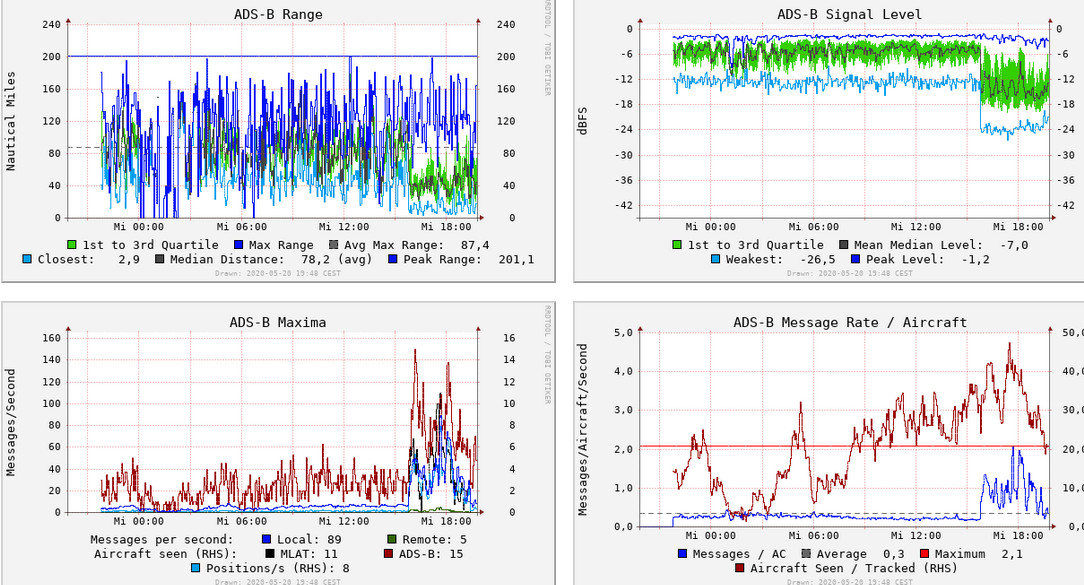

So You still recommend a filter - or shall I start some frequency scans before?
---
### Author:  [@foxhunter](https://discussions.flightaware.com/u/foxhunter)
#### Post date: [May 20, 2020, 6:46pm UTC](https://discussions.flightaware.com/t/skyaware-display-issues/58277/19 "2020-05-20T18:46:26Z")
leave it with this value for the next 24 hours.
With this low traffic at the evening it is a mission impossible to determine the correct gain settings.
Your first plot shows too much gain. After i got my new Jetvision antenna i needed to reduce it down to 40.2 which gave me the best value keeping an eye on the messages \> 3dbFS (should be max 5%)
Now i am using a FA filter between antenna and blue FA stick.
Gain back to 49.6, but the messages \> -3dbFS stayed below the “magic” 5%
But the low overall traffic makes it hard to determine if right or wrong.
This is the graph with the time i installed the filter. before that gain was at 40.2
Consider the small peak the same day in messages \> -3dBFS
I had gain set to “-10” for a few hours, but it did not work, so i went down to 49.6 which seem to be fine now.

---
### Author:  [@astrodeveloper](https://discussions.flightaware.com/u/astrodeveloper)
#### Post date: [May 20, 2020, 7:35pm UTC](https://discussions.flightaware.com/t/skyaware-display-issues/58277/20 "2020-05-20T19:35:57Z")
Looking at the ADSB Signal Level chart, the early part of the light blue line shows unusually high levels. This is the minimum signal level seen at the receiver. This implies to me a high level of background noise/ interference. That level could easily mess with the ADSB signals. When you reduced the gain, the minimum signal level reduced and the higher levels changed but into a more normal range. My FA receivers seem to have the light blue line around -24, my airspy receiver drops to about -30.
You may need a filter before the receiver as Foxhunter mentioned. Good idea to run a scan of signal levels to get an idea of what is affecting your reception. I ran one before buying my filter, and it showed heavy interference around the 900Mhz band. Have fun with it, always things to learn working with this stuff.
---
### Author:  [@foxhunter](https://discussions.flightaware.com/u/foxhunter)
#### Post date: [May 20, 2020, 8:20pm UTC](https://discussions.flightaware.com/t/skyaware-display-issues/58277/21 "2020-05-20T20:20:26Z")
I was running a scan before and after the filter attached. i’ve documented this also in the long thread “[Do i need a filter](https://discussions.flightaware.com/t/do-i-need-a-filter/27833/677)?” with lots of information in it.
You can see the areas of unwanted signal in the picture “without filter”.

[Next page](https://discussions.flightaware.com/t/skyaware-display-issues/58277.md?page=2)