# Antenna corrosion problem
**URL:** https://discussions.flightaware.com/t/antenna-corrosion-problem/99170
**Category:** ADS-B Flight Tracking
**Created:** [July 31, 2025, 10:47am UTC](https://discussions.flightaware.com/t/antenna-corrosion-problem/99170 "2025-07-31T10:47:36Z")
**Posts on this page:** 14
**Page:** 1
### Author:  [@LA7DFA](https://discussions.flightaware.com/u/LA7DFA)
#### Post date: [July 31, 2025, 10:47am UTC](https://discussions.flightaware.com/t/antenna-corrosion-problem/99170/1 "2025-07-31T10:47:36Z")
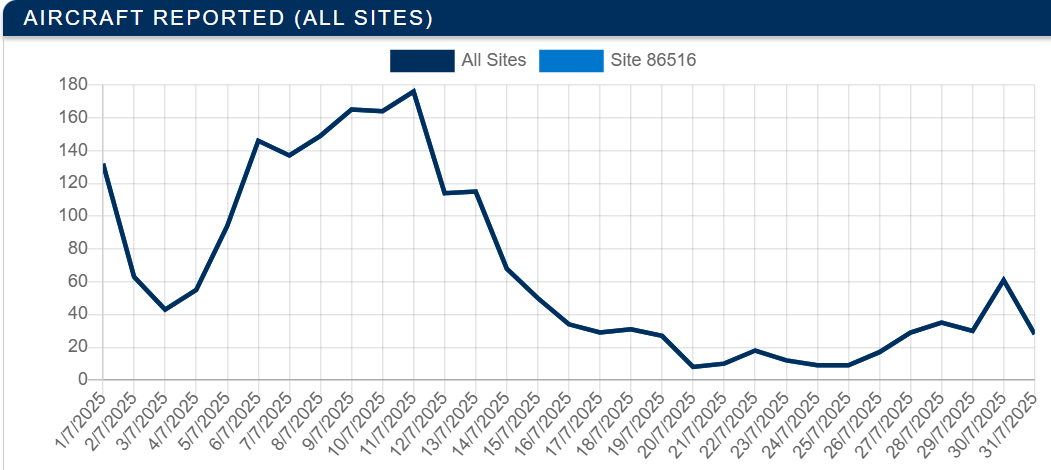
I have the 1090MHz Flightaware antenna with GPS, but lately it has been failing. I get better reception using my 144MHz vertical as a comparison.
The GPS have not worked for some time either.
I have measured the cable and it is in good shape. The connector on the antenna is corrosion free due to my own sealant.
Today I tried to twist off the fibreglass from the base of the antenna with a pipe wrench, but it would not move and all it did was to scratch it.
What I suspect is corrosion on both antennas inside the fibre glass tube.
Normally I have received 180-200 planes a day for years and regularly some beyond 400nm, but now the antenna has failed.
Is there a better antenna with a sealed circuit inside. The design with an open amplifier and electronic components is just too prone to humidity.
Perhaps a simple 1090MHz antenna and a separate USB GPS could be a solution?
---
### Author:  [@tomvdhorst](https://discussions.flightaware.com/u/tomvdhorst)
#### Post date: [July 31, 2025, 12:51pm UTC](https://discussions.flightaware.com/t/antenna-corrosion-problem/99170/2 "2025-07-31T12:51:19Z")
Have a look at the people from Vinnant in Slovakia.
I have multiple antennas from them, a number of them are outdoors and I never had an issue with that equipment.I have almost all types except the FE series in use.
They have multiple options for reasonable prices and they ship it against realistic cost to your place.
The COL1090/5-SU is on par with the Flightaware outdoor antenna.
> **[E-Shop](https://vinnant.sk/store/page/1?productlist-search=&productlist-sort=created-desc&productlist-categories=1090mhz-ads-b&productlist-tags=&productlist-itemcount=20)**
---
### Author:  [@wiedehopf](https://discussions.flightaware.com/u/wiedehopf)
#### Post date: [July 31, 2025, 1:50pm UTC](https://discussions.flightaware.com/t/antenna-corrosion-problem/99170/3 "2025-07-31T13:50:27Z")
> [@LA7DFA](#):
>
> Perhaps a simple 1090MHz antenna and a separate USB GPS could be a solution?
No need for GPS unless you run some earlier flightfeeder boxes.
And for those you’ll need the specialized antenna if they expect both signals on the same input.
---
### Author:  [@LawrenceHill](https://discussions.flightaware.com/u/LawrenceHill)
#### Post date: [July 31, 2025, 1:50pm UTC](https://discussions.flightaware.com/t/antenna-corrosion-problem/99170/4 "2025-07-31T13:50:59Z")
> [@LA7DFA](#):
>
> The GPS have not worked for some time either.
I see from your stats that you seem to be running a FlightFeeder but it says you have Version 10.
According to this post Version 10 is not available for the FlightFeeder:
> [@No sectional charts using PiAware](https://discussions.flightaware.com/t/no-sectional-charts-using-piaware/90947/19):
>
> For users with PiAwares, new sectional charts from the FAA were added in version 10. For FlightFeeder users, the charts have not yet been integrated into the latest FlightFeeder version. We will pull in the charts on the next FlightFeeder update, but we don’t have a timeline for that at the moment. We will keep you updated once we do!
Is it your own FlightFeeder or a FlightAware one?
Are you sure it is a corrosion problem and not that you might have broken things by updating the Firmware?
If it is a FlightAware FlightFeeder then they may be able to provide a replacement antenna if it has failed. It looks like there were some faulty ones supplied:
> **[Antenna Replacement Instructions for FlightFeeder - FlightAware](https://uk.flightaware.com/adsb/flightfeeder/antenna)**
>
> Best Flight Tracker: Live Tracking Maps, Flight Status, and Airport Delays for airline flights, private/GA flights, and airports.
Support for FightAware managed FlightFeeders is at:
[adsbsupport@flightaware.com](mailto:adsbsupport@flightaware.com)
---
### Author:  [@LA7DFA](https://discussions.flightaware.com/u/LA7DFA)
#### Post date: [July 31, 2025, 2:35pm UTC](https://discussions.flightaware.com/t/antenna-corrosion-problem/99170/5 "2025-07-31T14:35:56Z")
Hi thanks for the reply and information. The equipment is all from Flightaware. Software is version 10.0. I received it in August 2018, and I got a new antenna from them in 2022? after the outdoor connector was corroded. The software is all remotely updated, I do not touch that unit myself unless it is to check for status.
I made sure to seal the new connector in plasti-dip and also the joint between the fibreglass and the metal part on the antenna itself. The most likely cause for corrosion is condensation I think.
I see a clear improvement on number of receptions and range when i change from the 1090MHz antenna to my off band amateur radio one, so this is clearly not software related, but range/sensitivity due to bad contact inside the antenna itself.
---
### Author:  [@LawrenceHill](https://discussions.flightaware.com/u/LawrenceHill)
#### Post date: [July 31, 2025, 3:32pm UTC](https://discussions.flightaware.com/t/antenna-corrosion-problem/99170/6 "2025-07-31T15:32:44Z")
> [@LA7DFA](#):
>
> I see a clear improvement on number of receptions and range when i change from the 1090MHz antenna to my off band amateur radio one, so this is clearly not software related
I was wondering though if your GPS problem was software related though. The original antenna I presume has an active GPS antenna built in. I didn’t know if the 1090 part was also active and whether there was a software bias-tee. I’m afraid I don’t know much about FlightFeeder configurations. But if it is being remotely updated by FlightAware then we can assume it is correct software wise.
---
### Author:  [@TonyLeverett](https://discussions.flightaware.com/u/TonyLeverett)
#### Post date: [July 31, 2025, 3:36pm UTC](https://discussions.flightaware.com/t/antenna-corrosion-problem/99170/7 "2025-07-31T15:36:22Z")
A few thoughts on this. I note the comment about ‘No sectional charts using PIAware’ was posted in January and that these were going to be added on the next update. Given that you are using Version 10.0 of PiAware, version 10.1 was subsequently released and the current release (V10.2) is an update to that.
Since you mention that the equipment is from FlightAware, it might be worth checking with them as to whether they have any ideas why yours may not have yet been updated, which _may_ solve your charts issue.
As a radio ham myself, I’d be tempted to look at replacing the antenna, rather than trying to repair same, as if there is water damage internally, it would be unlikely that any circuitry is intact. My antenna (AirNav ADS-B 1090 MHz Outdoor antenna with SMA connector) came from [Radarbox.com](http://Radarbox.com) (by way of Amazon) and seems to work well for me.
---
### Author:  [@LA7DFA](https://discussions.flightaware.com/u/LA7DFA)
#### Post date: [July 31, 2025, 3:55pm UTC](https://discussions.flightaware.com/t/antenna-corrosion-problem/99170/8 "2025-07-31T15:55:42Z")
> [@TonyLeverett](#):
>
I see no problem with the chart on my receiver. I live in Europe, so perhaps it did not affect me? I have had the list of received planes all the time, and all that changed recently is few receptions and just on shorter ranges due to the antenna issue.
I will look into getting a new type of antenna, because I do not want this to happen again in a few years.
I just wonder if losing MLAT due to no GPS is a “problem” or if I just can disregard it.
---
### Author:  [@TonyLeverett](https://discussions.flightaware.com/u/TonyLeverett)
#### Post date: [July 31, 2025, 4:12pm UTC](https://discussions.flightaware.com/t/antenna-corrosion-problem/99170/9 "2025-07-31T16:12:39Z")
My system is a Raspberry Pi 4, with th V10.2 image installed, that I’ve put on myself using Rufus. There is no GPS reciever attached to my system, and my system reports MLAT signals fine, because FlightAware triangulates the aircraft position from other nearby receivers, so not having a GPS should not be a problem.
Just remember that your FlightAware account needs to have your location set, though, otherwise things do go a bit wobbly!!
---
### Author:  [@LawrenceHill](https://discussions.flightaware.com/u/LawrenceHill)
#### Post date: [July 31, 2025, 4:35pm UTC](https://discussions.flightaware.com/t/antenna-corrosion-problem/99170/10 "2025-07-31T16:35:24Z")
> [@TonyLeverett](#):
>
> I note the comment about ‘No sectional charts using PIAware’ was posted in January
The thread started in January but the reply I linked to by @eric1tran was posted yesterday.
---
### Author:  [@LawrenceHill](https://discussions.flightaware.com/u/LawrenceHill)
#### Post date: [July 31, 2025, 4:44pm UTC](https://discussions.flightaware.com/t/antenna-corrosion-problem/99170/11 "2025-07-31T16:44:41Z")
> [@TonyLeverett](#):
>
> My system is a Raspberry Pi 4, with the V10.2 image installed
Do not get confused between PiAware images and FlightFeeder images.
They are different images and the version numbers do not align.
Version 10 PiAware is not the same a Version 10 FlightFeeder.
In fact there is more than one hardware version of FlightFeeder and they have different software version numbers (the latest hardware FlightFeeders are now on Version 11)..
---
### Author:  [@TonyLeverett](https://discussions.flightaware.com/u/TonyLeverett)
#### Post date: [July 31, 2025, 5:12pm UTC](https://discussions.flightaware.com/t/antenna-corrosion-problem/99170/12 "2025-07-31T17:12:18Z")
@LawrenceHill and there was me thinking that all systems were running the same version. That would be way too simple 🤣
---
### Author:  [@tomvdhorst](https://discussions.flightaware.com/u/tomvdhorst)
#### Post date: [July 31, 2025, 8:19pm UTC](https://discussions.flightaware.com/t/antenna-corrosion-problem/99170/13 "2025-07-31T20:19:24Z")
no, that isn’t the case. Flightfeeders can’t be maintained by forum members since the equipment is owned by FA itself and they maintain software and configurations.
Only recently they started selling Flightfeeder Pro’s where you own the equipment but FA maintains it for you.
I always refer people to [adsbsupport@flightware.com](mailto:adsbsupport@flightware.com) since that is the place for support on FA flightfeeders.
I own all my equipment myself so never have to deal with a flightfeeder. (applied once, got turned down, way too many receivers in the Amsterdam area 😎 )
---
### Author:  [@LA7DFA](https://discussions.flightaware.com/u/LA7DFA)
#### Post date: [September 30, 2025, 12:31pm UTC](https://discussions.flightaware.com/t/antenna-corrosion-problem/99170/14 "2025-09-30T12:31:25Z")
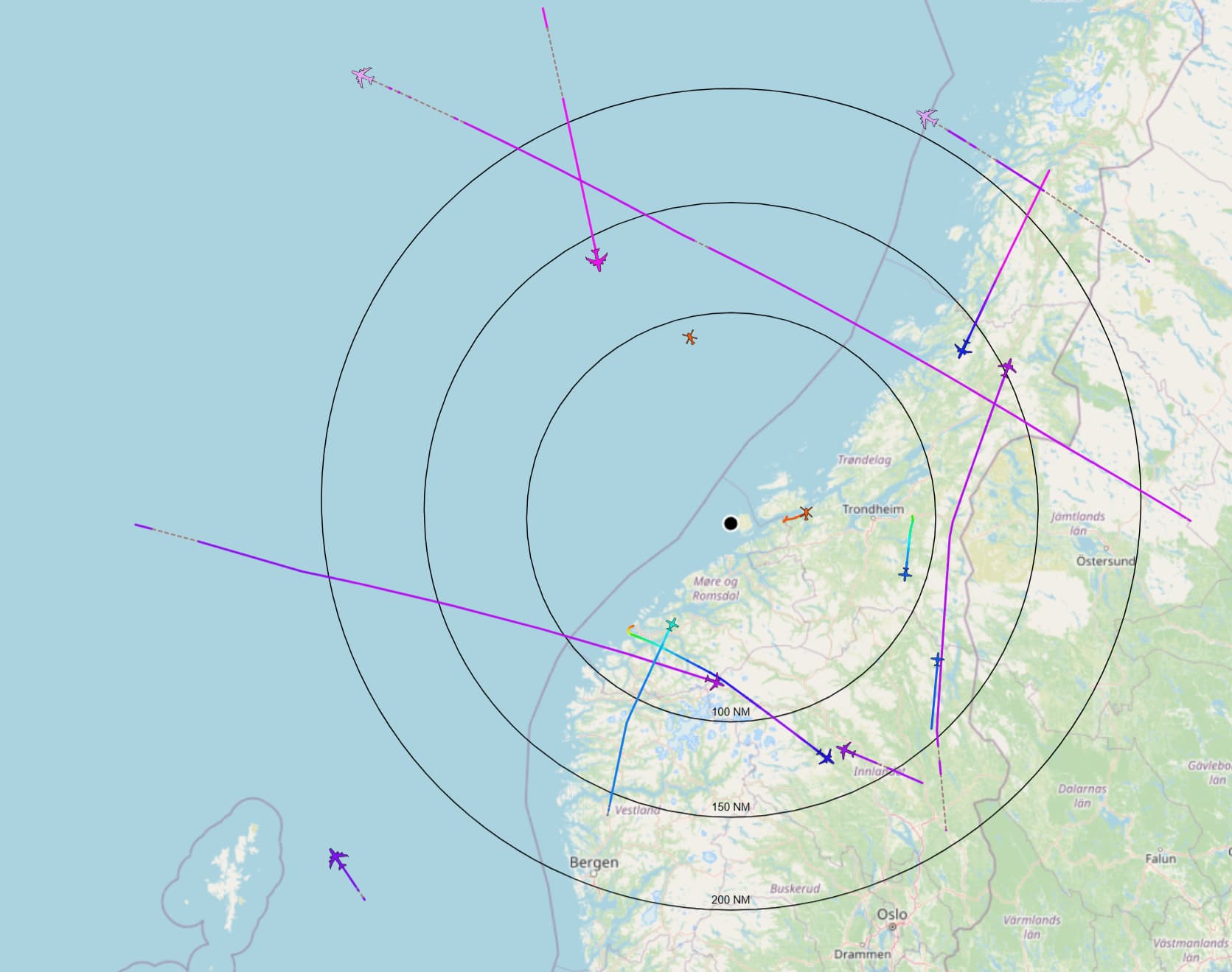
I have bought a new 9dBi antenna and external preamp with filter from Aliexpress.
I use an RG6 (75 Ohm) gelfilled cable. The impedance does not matter that much because of the preamp. Anyway the signals are better than with the FA supplied antenna when it was new.
Signals along the horizon seems to reach further beyond 200NM and the ones overhead still are received well despite the flatter diagram.
[https://www.aliexpress.com/item/4000062647637.html](https://www.aliexpress.com/item/4000062647637.html)
[https://www.aliexpress.com/item/1005007282736756.html](https://www.aliexpress.com/item/1005007282736756.html)